Ops Per Run, Not Message Volume, Decides Rent or Build
I assumed one billable operation per message. A week of instrumented runs said four, and that single number moved the payback from 200 months to 14.

A WhatsApp order bot at 2,000 messages a month looks like an obvious candidate to own rather than rent. I priced one that way and the arithmetic said the opposite: at that volume the rented plan never paid back the build. The number that decided it was not the message count. It was how many billable operations a single message consumes — I had assumed one, and a real run consumed four.
Both of those numbers are measurable in an afternoon, and until you have them the rent-or-build argument is two people trading adjectives. Here is the instrumentation that produces them, the cost model they feed, and what the payback actually came out to.
Sticker prices decide nothing
The usual comparison lines up monthly fees. On any workflow that succeeds, the fee is the smallest term in the bill. Two numbers move it:
Runs per month — how often the trigger fires.
Billable operations per run — how many steps each run consumes.
The first one people know. The second one people guess, and they guess low, because a "task" on a per-operation platform is a step, not a message. Parsing the message is one. Appending the row is one. Sending the reply is one. The filter that decided whether to continue is one. A run that a filter stops halfway still consumed everything up to the filter, and a step that fails and retries bills for both attempts.
Four operations instead of one is a four-times bill at the same message volume. That is the whole difference between a build that pays back inside a year and one that never does, and it is measurable rather than arguable.
Step 1: count the operations in the run you already have
Wrap each billable step so the count comes from a real execution rather than from a diagram. Two details matter more than they look: the counter records the attempt, not the success, and the log is written in a finally block so a run that dies halfway still reports what it consumed.
// Wraps each billable step and records the attempt. A retry is a
// second billable operation on a per-operation platform, so it is
// pushed under its own name rather than folded into the first.
function makeStepCounter(ops) {
  return function step(name, fn) {
    ops.push(name);
    try {
      return fn();
    } catch (err) {
      ops.push(name + ':retry');
      return fn();
    }
  };
}

// The run itself. Note the finally: a run that a filter stops, or
// one that throws on the last step, was still billed for the steps
// it reached. Logging only completed runs undercounts the bill.
function runOrder(msg, deps) {
  var ops = [];
  var step = makeStepCounter(ops);
  try {
    var parsed = step('parse', function () {
      return deps.parseOrder(msg);
    });
    if (!parsed.isOrder) return null;
    step('append', function () {
      return deps.appendOrder(parsed);
    });
    step('reply', function () {
      return deps.sendReply(parsed);
    });
    return parsed;
  } finally {
    deps.logRun(ops);
  }
}

// Turn the logged runs into the two numbers the cost model needs.
// Use the mean, not the happy path: the filtered and failed runs
// are the ones that quietly move the average.
function usageFromLog(rows) {
  if (!rows.length) throw new Error('no runs logged yet');
  var total = 0;
  for (var i = 0; i < rows.length; i++) total += rows[i].ops;
  return { runs: rows.length, opsPerRun: total / rows.length };
}

function monthlyUsage(rows, daysObserved) {
  if (!(daysObserved > 0)) throw new Error('daysObserved must be > 0');
  var seen = usageFromLog(rows);
  return {
    runs: Math.round((seen.runs / daysObserved) * 30),
    opsPerRun: seen.opsPerRun
  };
}
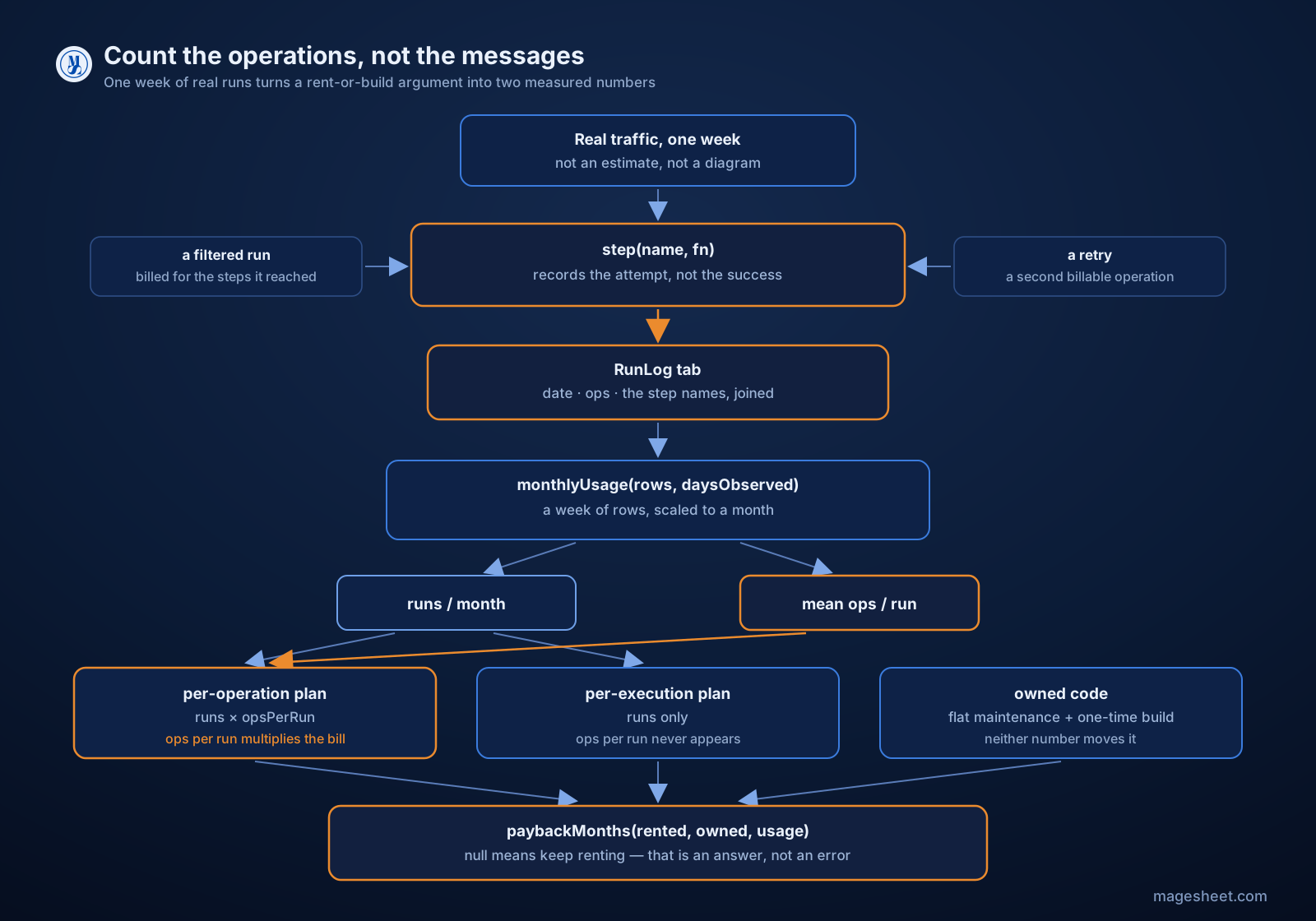
In Apps Script, deps.logRun is a one-line appendRow onto a RunLog sheet — timestamp, ops.length, and ops.join('|') so you can see afterwards which step was the expensive one. Run it for a week on the real traffic. A week of real messages beats any estimate, because the filtered runs and the retries show up in it and they never show up in an estimate.
Step 2: the three shapes a bill can take
Rented automation bills in one of two shapes, and owned code bills in a third. The shape, not the price, is what makes the numbers move differently as you grow.
// Fill these from your own invoice. The numbers below are
// placeholders chosen to show the shapes, not quotes from any
// vendor, and every platform changes its plans -- read your bill.
var PLANS = {
  perOperation: { kind: 'op',  fee: 29, included: 10000, over: 0.002 },
  perExecution: { kind: 'run', fee: 24, included: 5000,  over: 0.004 },
  owned:        { kind: 'own', maintain: 40, build: 1800 }
};

// Recurring monthly cost, deliberately excluding model tokens.
// You pay the same tokens whichever side you land on, so leaving
// them in flattens the difference you are trying to measure.
function monthlyCost(plan, usage) {
  if (plan.kind === 'own') return plan.maintain;
  var billable = plan.kind === 'op'
    ? usage.runs * usage.opsPerRun
    : usage.runs;
  var extra = Math.max(0, billable - plan.included);
  return plan.fee + extra * plan.over;
}
The kind field is the whole point. On a per-operation plan, opsPerRun multiplies straight into the bill. On an execution-billed plan it does not appear at all — a run with twelve steps costs the same as a run with one. Two platforms with near-identical sticker prices produce completely different curves on the same workflow, and which one is cheaper flips depending on how chatty your run is.
The owned side is a flat maintenance figure plus a one-time build. Leaving the maintenance line at zero is the single most common way these comparisons get faked. Someone patches the code when an API changes; put a number on that person's time or the payback you compute is fiction.
Step 3: the payback, and what it came out to
// Whole months until the build pays for itself. Returns null when
// renting is simply cheaper -- that is a real answer, not an error
// case, and at low volume it is the usual one.
function paybackMonths(rented, owned, usage) {
  var saved = monthlyCost(rented, usage) - monthlyCost(owned, usage);
  if (saved <= 0) return null;
  return Math.ceil(owned.build / saved);
}
Running that over the measured usage, against the placeholder per-operation plan above:
| Runs / month | Ops per run | Billable ops | Rent | Own | Payback |
|---|---|---|---|---|---|
| 2,000 | 4 | 8,000 | $29 | $40 | never |
| 5,000 | 4 | 20,000 | $49 | $40 | 200 months |
| 10,000 | 4 | 40,000 | $89 | $40 | 37 months |
| 20,000 | 4 | 80,000 | $169 | $40 | 14 months |
| 20,000 | 2 | 40,000 | $89 | $40 | 37 months |
| 20,000 | 1 | 20,000 | $49 | $40 | 200 months |
Two things fall out of that table, and neither is what the rent-or-build pitch usually claims.
The first is that at the volume most small businesses actually run — the 2,000-messages-a-month order bot — the rented plan wins outright. The included pool swallows the whole workflow and the subscription is less than the maintenance. There is no payback to compute, because there is nothing being saved.
The second is the interesting one. Compare the last three rows: same 20,000 runs a month, payback moves from 14 months to 200 months purely on operations per run. The message volume, the number everyone quotes first, is held constant across all three. The number that actually decided it is the one nobody measures.
Pitfalls
Counting messages instead of steps. The most expensive mistake here is silent: you divide the message count into the included pool, conclude you will never hit overage, and discover the multiplier on the invoice. Count from a run, not from the trigger.
Logging only successful runs. Filtered and crashed runs consumed operations too. Without the
finally, they vanish from your log and your average lands low.Forgetting that retries bill twice. A flaky third-party endpoint that retries once on a tenth of your runs adds ten percent to the operation count. If you are already handling retries with backoff — and you should be, see UrlFetchApp quotas, retries and backoff — then instrument the retry path, because your bill counts what your backoff loop does.
Leaving tokens in the comparison. Both sides pay the model provider the same tokens for the same prompts. Including them in the rent-or-build math shrinks a real difference into noise. Exclude them from the comparison, then add them back to the budget, where they belong.
A zero maintenance line on the owned side. It makes every payback look good. Price the hour or two a month somebody spends on it, or you have not made a comparison at all.
Comparing against a plan you have not read. Whether filters, routers and error handlers are billable operations varies by platform and by plan. That single detail moves
opsPerRunmore than anything in your own code does.
The one thing worth taking away
Instrument the workflow for a week before you argue about it. Ops per run is the term that decides rent-or-build, it is off by a factor of four when you guess it, and it costs an afternoon to measure properly. If the measurement says rent, rent — that is what a decision procedure is for.
The full decision framework this sits inside, including the cases where a rented platform is the right answer regardless of the arithmetic, is on the MageSheet blog.