Syncing a Google Sheet to a Mailjet List Without Re-Subscribing Anyone
addforce re-subscribes people who left, addnoforce forgets them after a list cleanup, and the list never guards the Send API. The sheet has to keep the record.

A common setup: a customer list lives in a Google Sheet, and a nightly Apps Script job mirrors it into a Mailjet contact list so campaigns go to whoever is in the sheet. The simplest version of that job sends every row to Mailjet with the action addforce. It runs cleanly for weeks, and it re-subscribes anyone who clicked unsubscribe since the last run, because that is exactly what addforce is documented to do.
The fix is not one setting. Mailjet has four actions for putting contacts into a list, and only one of them leaves an unsubscribe alone. Even that one stops protecting a person once a list cleanup removes them. So the sheet has to learn about unsubscribes before it pushes anything, and keep that knowledge itself.
This is the contact-list half of a Mailjet integration. Sending from rows and logging opens and bounces through the Event API is covered in my Google Sheets email guide, so I will not repeat it here.
The four actions, and the one that resubscribes people
Contacts go into a list through POST /v3/REST/contactslist/{list_ID}/managemanycontacts. The body is an Action plus an array of contacts. Mailjet's bulk contact guide defines the actions like this:
| Action | Contact not in the list | Contact in the list as unsubscribed |
|---|---|---|
addforce |
added and subscribed | subscribed again |
addnoforce |
added and subscribed | stays unsubscribed |
remove |
nothing | removed from the list |
unsub |
nothing | stays unsubscribed |
addforce is the dangerous one for a sync. It is the right call when a person has just opted in again on your own signup form. It is the wrong call for a scheduled job that sends the whole sheet every night, because the sheet does not know who unsubscribed in Mailjet since the last run.
addnoforce fixes the common case. The gap is the second column. When someone unsubscribes and a later cleanup uses remove on that list, there is no list membership left to remember the unsubscribe. On the next run addnoforce sees a contact that is not in the list and subscribes it. The person who left is back.
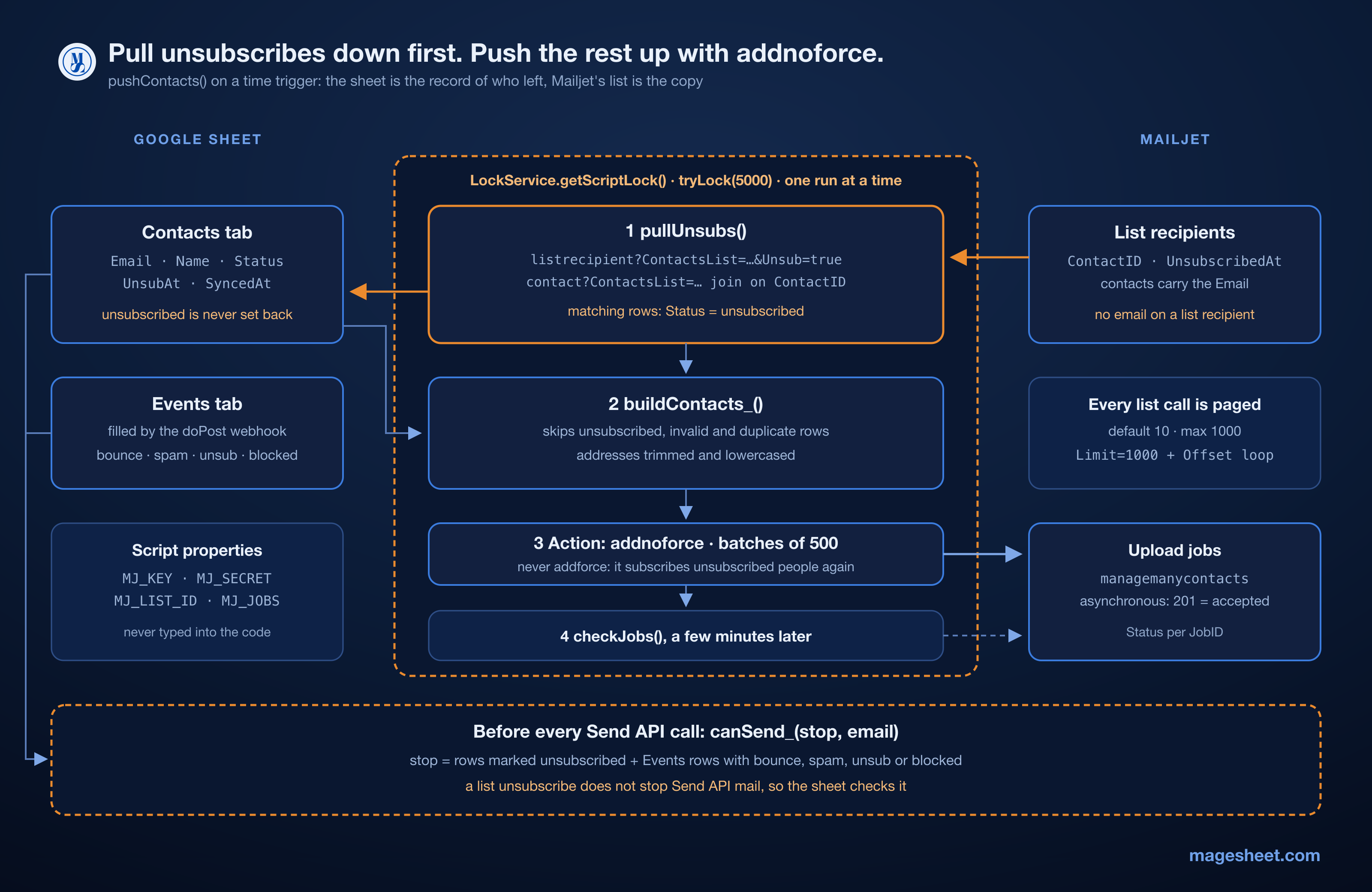
So the rule has two parts. Push with addnoforce only. And before every push, pull Mailjet's unsubscribes down into the sheet, where they stay even after Mailjet forgets them.
Pulling unsubscribes down first
The list membership lives in the listrecipient resource. It takes a ContactsList filter and an Unsub=true filter that returns only unsubscribed members. Two details in its response shape the code.
First, a list recipient carries a ContactID, not an email address. To match it to a sheet row you also need the list's contacts from GET /v3/REST/contact?ContactsList=..., which do have Email, and you join on the ID.
Second, every list endpoint is paged. The default page size is 10 and the maximum is 1000, so a call with no Limit silently returns the first ten unsubscribes and looks like it worked. mjAll_ below asks for 1000 at a time and keeps going until a page comes back short.
The Contacts tab has five columns: Email | Name | Status | UnsubAt | SyncedAt. Put MJ_KEY, MJ_SECRET and MJ_LIST_ID in Project Settings, Script properties, not in the code.
// Contacts tab: Email | Name | Status | UnsubAt | SyncedAt
const MJ_REST = 'https://api.mailjet.com/v3/REST/';
const PAGE = 1000; // Mailjet's max per page; default is only 10

function mj_(method, path, body) {
  const p = PropertiesService.getScriptProperties();
  const auth = Utilities.base64Encode(
    p.getProperty('MJ_KEY') + ':' + p.getProperty('MJ_SECRET')
  );
  const res = UrlFetchApp.fetch(MJ_REST + path, {
    method: method,
    contentType: 'application/json',
    headers: { Authorization: 'Basic ' + auth },
    payload: body ? JSON.stringify(body) : undefined,
    muteHttpExceptions: true,
  });
  const code = res.getResponseCode();
  if (code >= 300) {
    throw new Error(method + ' ' + path + ' -> ' + code);
  }
  return JSON.parse(res.getContentText());
}

function mjAll_(path) {
  const out = [];
  for (let offset = 0; ; offset += PAGE) {
    const sep = path.indexOf('?') === -1 ? '?' : '&';
    const page = mj_('get',
      path + sep + 'Limit=' + PAGE + '&Offset=' + offset);
    out.push.apply(out, page.Data);
    if (page.Count < PAGE) return out;
  }
}

function norm_(email) {
  return String(email || '').trim().toLowerCase();
}

// Step 1 of every sync: copy Mailjet's unsubscribes into the sheet.
function pullUnsubs() {
  const listId = PropertiesService.getScriptProperties()
    .getProperty('MJ_LIST_ID');
  const unsubs = mjAll_('listrecipient?ContactsList=' + listId +
    '&Unsub=true');
  if (!unsubs.length) return 0;

  // listrecipient carries ContactID, not the address
  const emailById = {};
  mjAll_('contact?ContactsList=' + listId).forEach(c => {
    emailById[c.ID] = norm_(c.Email);
  });
  const unsubAt = {};
  unsubs.forEach(r => {
    const email = emailById[r.ContactID];
    if (email) unsubAt[email] = r.UnsubscribedAt || 'unknown';
  });
  return markUnsubscribed_(unsubAt);
}

function markUnsubscribed_(unsubAt) {
  const sheet = SpreadsheetApp.getActive().getSheetByName('Contacts');
  const values = sheet.getDataRange().getValues();
  let changed = 0;
  for (let i = 1; i < values.length; i++) {
    const at = unsubAt[norm_(values[i][0])];
    if (at && values[i][2] !== 'unsubscribed') {
      values[i][2] = 'unsubscribed';
      values[i][3] = at;
      changed++;
    }
  }
  if (changed) {
    sheet.getRange(1, 1, values.length, values[0].length)
      .setValues(values);
  }
  return changed;
}
markUnsubscribed_ only ever writes unsubscribed. Nothing in this code sets a row back to subscribed. If a person really does opt in again, that happens through a form you control, and a person clears the Status cell on purpose. The sheet is the record of who asked to leave. Mailjet is the copy.
Pushing up with addnoforce, in batches
The push reads the sheet, drops anything that is not a plausible address, drops every row marked unsubscribed, and removes duplicates after trimming and lowercasing. buildContacts_ is a pure function so it can be tested without Apps Script.
const BATCH = 500; // my choice; keeps each job small

// Pure: which rows go up, deduplicated, never an unsubscribed one.
function buildContacts_(values) {
  const seen = {};
  const out = [];
  values.slice(1).forEach(row => {
    const email = norm_(row[0]);
    if (!/^[^@\s]+@[^@\s]+\.[^@\s]+$/.test(email)) return;
    if (row[2] === 'unsubscribed' || seen[email]) return;
    seen[email] = true;
    out.push({ Email: email, Name: String(row[1] || '') });
  });
  return out;
}

function pushContacts() {
  const lock = LockService.getScriptLock();
  if (!lock.tryLock(5000)) return; // another sync is running
  try {
    pullUnsubs(); // down first, then up
    const props = PropertiesService.getScriptProperties();
    const listId = props.getProperty('MJ_LIST_ID');
    const sheet = SpreadsheetApp.getActive()
      .getSheetByName('Contacts');
    const contacts = buildContacts_(sheet.getDataRange().getValues());

    const jobs = [];
    for (let i = 0; i < contacts.length; i += BATCH) {
      const res = mj_('post',
        'contactslist/' + listId + '/managemanycontacts', {
          Action: 'addnoforce', // never 'addforce' from a sheet
          Contacts: contacts.slice(i, i + BATCH),
        });
      jobs.push(res.Data[0].JobID);
    }
    props.setProperty('MJ_JOBS', JSON.stringify(jobs));
    return jobs;
  } finally {
    lock.releaseLock();
  }
}

// Run a few minutes later: the upload is asynchronous.
function checkJobs() {
  const props = PropertiesService.getScriptProperties();
  const listId = props.getProperty('MJ_LIST_ID');
  const jobs = JSON.parse(props.getProperty('MJ_JOBS') || '[]');
  return jobs.map(id => {
    const job = mj_('get', 'contactslist/' + listId +
      '/managemanycontacts/' + id).Data[0];
    return { id: id, status: job.Status, error: job.Error || '' };
  });
}
A few choices in there are deliberate.
pullUnsubs() runs inside pushContacts(), before the upload, not on a separate trigger. If the two ran on their own schedules, a push could land between someone unsubscribing and the next pull.
The script lock stops two overlapping runs from interleaving a pull and a push. A second run that cannot get the lock in five seconds exits without making a call.
managemanycontacts is asynchronous. The response is a JobID, not a result, so a 201 only means the job was accepted. checkJobs() reads each job with GET .../managemanycontacts/{job_ID} and returns its Status and Error. I run it from a time trigger a few minutes after the push and log anything that is not Completed.
The batch size of 500 is my own choice. The guide I worked from does not state a ceiling for this endpoint, so treat 500 as a conservative default, not a Mailjet limit.
The list does not protect the Send API
This one surprised me. A list unsubscribe stops campaigns sent to that list. Mailjet's exclusion-list guide says contacts on the exclusion list "will still be able to receive messages sent via the Send API". A Send API call names a recipient, not a list, and I found nothing in the docs that makes it check list membership. So a script that mails people directly from the sheet has to do that check itself.
If the same spreadsheet also sends one-to-one mail through the Send API, as in the sending guide, it has to check its own records before every send. The suppression set below merges the sheet's unsubscribes with the bounce, spam, unsub and blocked rows of the Events tab that the webhook fills.
const STOP_EVENTS = ['bounce', 'spam', 'unsub', 'blocked'];

// Pure: one set of addresses that must not get another email.
function suppressionSet_(contactRows, eventRows) {
  const stop = {};
  contactRows.slice(1).forEach(r => {
    if (r[2] === 'unsubscribed') stop[norm_(r[0])] = 'unsubscribed';
  });
  // Events tab: Time | Event | Email | CustomID | MessageID | Error
  eventRows.slice(1).forEach(r => {
    if (STOP_EVENTS.indexOf(r[1]) !== -1) stop[norm_(r[2])] = r[1];
  });
  return stop;
}

function loadSuppression_() {
  const ss = SpreadsheetApp.getActive();
  const rows = name => {
    const sh = ss.getSheetByName(name);
    return sh ? sh.getDataRange().getValues() : [[]];
  };
  return suppressionSet_(rows('Contacts'), rows('Events'));
}

// Call this before every Send API request.
function canSend_(stop, email) {
  const reason = stop[norm_(email)];
  return reason ? { ok: false, reason: reason } : { ok: true };
}
Build the set once per run with loadSuppression_(), then call canSend_(stop, email) for each row and write the returned reason into the row's status instead of sending. A reason in the sheet is easier to explain later than a missing email.
How I tested it
Apps Script services do not run outside Google, so I tested the three blocks in Node against a fake UrlFetchApp that behaves like the Mailjet endpoints above: the four actions as the bulk guide describes them, Unsub filtering, ContactID instead of email on list recipients, and a default page of 10.
35 checks pass. They cover the remove-then-resync case, 25 unsubscribes against a page size of 10, an unsubscribed contact sitting on the second page of a 1,100-contact list, 1,201 rows split into three jobs, the lock, a 401 that still releases the lock, and the suppression set.
To check that the tests can fail, I broke the code six ways and reran them. Switching to addforce failed 1 check. Dropping the page size back to 10 failed 5. Skipping the pull before the push failed 4. Letting unsubscribed rows through buildContacts_ failed 5. Narrowing the stop list to bounces only failed 2. Removing the Offset increment made mjAll_ loop until the test process ran out of memory, which is the same thing a real run would do until Apps Script killed it at six minutes.
Pitfalls I would check first
A call with no Limit returns ten rows. Nothing errors and the count looks plausible on a small list. Check any Mailjet list call for Limit and an Offset loop.
listrecipient has no email field. Matching on ContactID against a sheet of emails matches nothing, and the sync reports zero unsubscribes forever.
A list cleanup erases the unsubscribe. After remove, only your sheet remembers that the person left. If the sheet does not record it, addnoforce adds them back.
A 201 from managemanycontacts is not a success. It is an accepted job. Read the job status before you report the sync as done.
Contact endpoints have a lower rate limit than sending. Mailjet returns 429 when you go over the per-second limit, and its rate-limit page says the non-transactional APIs get much lower limits. mj_ throws on it, which stops the run. For larger lists, add the backoff from my UrlFetchApp retries guide.
The one thing to keep
Treat Mailjet's list as a copy of the sheet, not the other way round, and make the sheet the place where an unsubscribe can never be undone by a script. Pull before you push, push with addnoforce, and check the same record before any direct send. The full two-way setup, from the send loop and webhook to the dashboard formulas, is on the MageSheet blog.
Built by the MageSheet team.